GUI to merge PDFs with PyQt5
La información es el activo más valioso de cualquier persona o empresa. Información crítica o sensible no debería viajar por Internet "solo para unir un par de PDFs".
Cuando usas un servicio "gratuito" online, en realidad pagas con los datos que subes: no sabes si los archivos se borran del servidor, si se venden o si se usan para análisis. La solución es procesar todo localmente — aquí, una app de escritorio con PyQt5 + PyPDF2 que fusiona PDFs sin tocar la red.
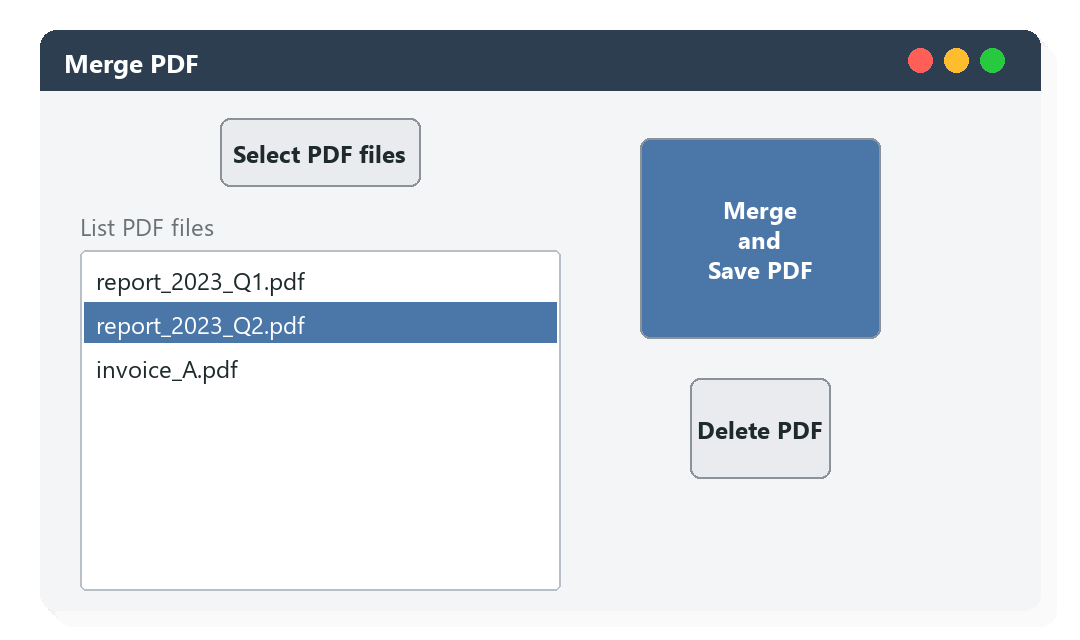
La app tiene una interfaz simple con dos columnas: a la izquierda el selector y la lista de archivos cargados; a la derecha los botones para fusionar + guardar y eliminar de la selección.
import sys
import os
from PyQt5.QtWidgets import (QApplication, QMainWindow, QPushButton, QWidget,
                             QHBoxLayout, QVBoxLayout, QLabel, QListWidget, QFileDialog)
from PyQt5.QtCore import Qt
import PyPDF2

#Functions of the buttons
all_file_paths = []
file_paths = None
def select_files():
    global file_paths
    dialog = QFileDialog()
    file_paths, _ = dialog.getOpenFileNames(caption = 'Select PDF files', directory = '/', filter = 'PDF files (*.pdf)')
    file_names = [os.path.basename(path) for path in file_paths]

    for file, path in zip(file_names, file_paths):
        if not any(file == list_wid.item(i).text() for i in range(list_wid.count())):
            list_wid.addItem(file)
            if path not in all_file_paths:
                all_file_paths.append(path)

def delete_files():
    select_item = list_wid.currentItem()

    if select_item is not None:
        item = list_wid.row(select_item)
        list_wid.takeItem(item)

def merger_save_files():
    try:
        file_names = all_file_paths
        pdf_finish = PyPDF2.PdfMerger()

        for name in file_names:
            pdf_finish.append(name)

        output_name, _ = QFileDialog.getSaveFileName(None, caption = 'Save PDF', filter = 'PDF Files (*.pdf)')
        pdf_finish.write(output_name)
        pdf_finish.close()

    except Exception as e:
        print(f'The error is: {e}')

#Creation of the app
app = QApplication(sys.argv)

wind = QMainWindow()
wind.setWindowTitle('Merge PDF')
wind.setGeometry(480, 250, 500, 250)

#Main Widget
main_widget = QWidget()

#Main Layout - Horizontal: This layout contains 2 vertical layouts
main_layout = QHBoxLayout(main_widget)

#First Vertical Layout
v_box_1 = QVBoxLayout()

#Button Select PDF of the First Vertical Layout
button_select_PDF = QPushButton('Select PDF files', main_widget)
button_select_PDF.setFixedSize(100, 40)
button_select_PDF.clicked.connect(select_files)

#Label and QList of the First Vertical Layout
list_lab = QLabel('List PDF files')
list_wid = QListWidget(main_widget)
list_wid.setFixedSize(240, 220)

#Add widgets to the First Vertical Layout
v_box_1.addWidget(button_select_PDF, alignment = Qt.AlignCenter)
v_box_1.addWidget(list_lab, alignment = Qt.AlignLeft)
v_box_1.addWidget(list_wid, alignment = Qt.AlignLeft)

#Second Vertical Layout
v_box_2 = QVBoxLayout()

#Button Merge and Save of the Second Vertical Layout
button_merge_save = QPushButton('Merge \nand \nSave PDF', main_widget)
button_merge_save.setFixedSize(120, 120)
button_merge_save.clicked.connect(merger_save_files)

#Button Delete of the Second Vertical Layout
button_delete = QPushButton('Delete PDF', main_widget)
button_delete.setFixedSize(70, 60)
button_delete.clicked.connect(delete_files)

#Add widgets to the Second Vertical Layout
v_box_2.addWidget(button_merge_save, alignment = Qt.AlignCenter)
v_box_2.addWidget(button_delete, alignment = Qt.AlignCenter)

#Add layouts to the Main Layout
main_layout.addLayout(v_box_1)
main_layout.addLayout(v_box_2)

#Show Main Widget
wind.setCentralWidget(main_widget)

#Show window
wind.show()

#Execute the app
sys.exit(app.exec_())
Flujo de uso:
- Select PDF files abre un diálogo nativo multi-selección. Los nombres se muestran en la lista y las rutas completas se guardan en
all_file_paths. - Delete PDF elimina el archivo seleccionado en la lista (sin tocar el original en disco).
- Merge and Save PDF usa
PyPDF2.PdfMerger()para concatenar los PDFs en el orden de la lista, y abre un diálogo de guardado para elegir destino y nombre.
Por qué PyQt5 en vez de Tkinter:
- Look & feel nativo en Windows, Mac y Linux — los widgets heredan el theme del sistema.
QFileDialogofrece el diálogo nativo del sistema operativo, con selección múltiple, filtros por extensión, y navegación estándar.- Soporta signals/slots (
clicked.connect(fn)), más limpio que loscommand=de Tkinter para GUIs grandes. - Es más fácil empaquetar con PyInstaller en un ejecutable standalone — ideal para distribuir a usuarios no-técnicos.
Empaquetar como ejecutable:
pip install pyinstaller
pyinstaller --onefile --windowed --name "Merge PDF" merge_pdf.py
Genera un .exe (Windows) / .app (Mac) / binario (Linux) de ~60 MB que incluye Python, PyQt5 y PyPDF2 — el usuario final no necesita instalar nada.
Extensiones naturales del proyecto:
- Drag & drop de archivos directamente sobre la ventana
- Previsualización de la primera página de cada PDF
- Reordenar la lista con botones ↑ / ↓ o arrastre
- Cifrado del PDF resultante con contraseña (
pdf_finish.encrypt('mypassword')) - Opción de extraer rangos de páginas por archivo antes de fusionar
Instalación:
pip install PyQt5 PyPDF2